Introduction
Char Dham Yatra registration is mandatory for all pilgrims visiting Chardham Temples, including Yamunotri, Gangotri, Kedarnath, and Badrinath. However, many pilgrims face difficulties while logging in again after registration, especially due to OTP delays, portal errors, or dashboard access issues. This guide provides clear, practical solutions for Char Dham registration login issues, helping pilgrims log in, check status, edit details, and download the registration certificate without confusion.
What Is Char Dham Yatra Registration Login?
Char Dham Registration login refers to the official Char Dham Uttarakhand Tourism registration login portal, where pilgrims must sign in and log in to make any changes to their application or obtain their mandatory registration process, which is required to visit the Char Dham Temples.
Official Char Dham Uttarakhand Tourism registration Login Portal
The Uttarakhand Government manages the official Char Dham registration login portal to ensure safe and regulated pilgrimage movement. All registrations, edits, and QR-based verification are handled through this single authorized platform.
Official Char Dham Registration Portal: registrationandtouristcare.uk.gov.
How To Login The Char Dham Registration Portal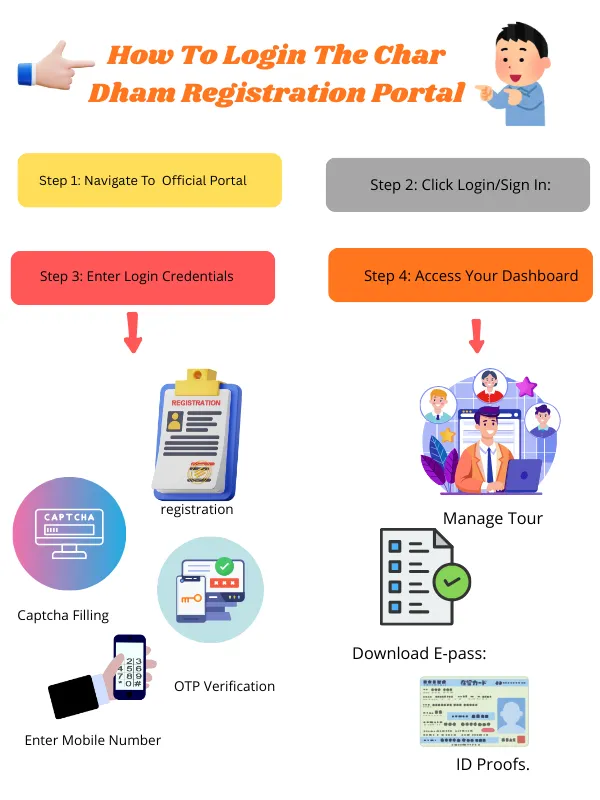
Step 1: Navigate To The Official Portal
Step 2: Click Login/Sign In:
Choose the login option on the homepage if you are already registered.
Step 3: Enter Login Credentials
-
Enter Mobile Number: Give your active mobile number, which you used in the initial Sign-up process.
-
Password: Enter the password that you created during the registration process.
-
Captcha Filling: Type the captcha that will show in a security image.
-
OTP : If you log in for the first time or for a specific security check, you receive an OTP. Fill it in for verification.
Step 4: Access Your Dashboard
After successful login, pilgrims can manage tour dates, add pilgrims, upload ID proofs, and download their e-pass from the dashboard.
How To Reset/Recover Login If OTP Not Received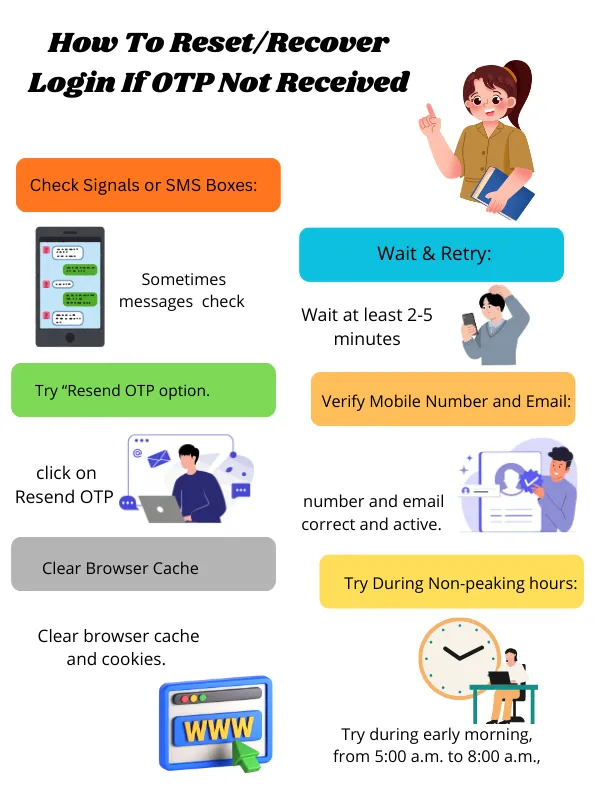
Not receiving OTP during char dham registration and login, which is a very common issue. But don’t worry, here is a solution -
Check Signals or SMS Boxes:
Firstly, ensure that your phone has a strong signal. Sometimes SMS messages are delayed, so check if your inbox is full or if the SMS went to the Spam folder.
Wait & Retry:
Wait at least 2-5 minutes before requesting a new OTP. Do not click on Resend OTP rapidly.
Verify Mobile Number and Email:
Ensure that the number and email you entered are correct and active.
Clear Browser Cache:
Clear browser cache and cookies.
Use an alternate browser, like try with a new tab
Try During Non-peaking hours:
Try during early morning, from 5:00 a.m. to 8:00 a.m., or late night from 10:00 p.m.
Char Dham Registration Login Page Not Working? Causes & Fixes
-
Server traffic: Try non-peak hours
-
Cache issue: Clear browser cache
-
Network instability: Use stable internet
-
Browser compatibility: Switch device/browser
How To Check Char Dham Yatra Registration Status After Login
After completing the Char Dham Yatra Registration process successfully, it’s important to verify registration status, as it ensures that your registration is approved or not and your QR is active or not.
Follow these steps for Char Dham Registration Check:
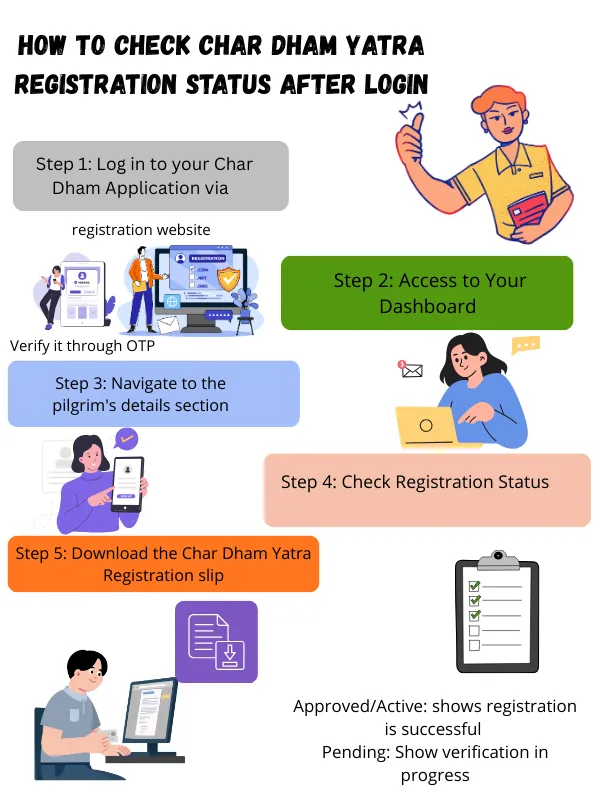
Step 1: Log in to your Char Dham Application via
-
your registered mobile number
-
Verify it through OTP
Step 2: Access to Your Dashboard
After logging in, you will be redirected to your User dashboard, where all your registration details will be displayed.
Step 3: Navigate to the pilgrim's details section
-
Click on “My Registration” or Registered Yatris” button
-
Select your name in the pilgrim name and check the temple selection
-
Verify travel date and personal details
Step 4: Check Registration Status
The status of registration will appear as one of the following:
-
Approved/Active: shows registration is successful
-
Pending: Show verification in progress
-
Incomplete: signifies that some details are missing
-
Cancelled/expired: Registration not valid
Step 5: Download the Char Dham Yatra Registration slip
-
Download your registration slip by clicking on “ Download QR Code .”
-
Save the PDF on your phone and take a screenshot for backup.
-
Carry a printed and digital copy of the QR during your travel.
How To Edit Or Update Char Dham Registration Details
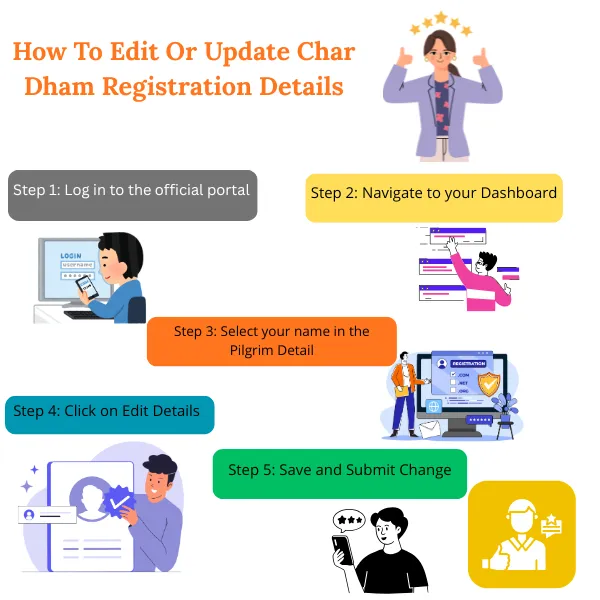
Steps To Follow -
-
Log in to your application through your registered mobile number
-
Enter the password that you created and the captcha that you see.
-
Verify your login process through OTP.
Step 2: Navigate to your Dashboard
After a successful Login, you can see “User Dashboard” in the right corner, where all your pilgrim details are listed.
Step 3: Select your name in the Pilgrim Detail
-
Click on “My Registration” button and select your name
Step 4: Click on Edit Details
-
Tap the Modify option
-
Make the required changes you want
Step 5: Save and Submit Change
Review all the details. Click the Save option and wait for the confirmation message on your mobile phone.
Common Issues While Updating Details With Their Solutions
-
Updates or changes are not saving: Sometimes, the change you made in your registration application is not being saved due to a server issue.
Solution: Refresh your page or log in again.
-
The edit button is not visible: Due to high traffic on the registration portal, the Edit button is not showing.
Solution: Try with another device or browser, such as in an incognito tab.
-
Server Issues: Temporary server issues leads problems in updating details.
Solution: Try the letter again or after some time.
What Details Can Be Edited After Registration?
Pilgrims can usually update some details after their Registration, which are:
-
Correction in Name: If there is a spelling mistake in the name , it can be edited.
-
Update in Age and Gender
-
ID Proof Details: If you make any changes to your ID proof details
-
Travel Date: Pilgrims can easily make changes in their travel dates related to the Dhams. The site will show available slots for new dates.
-
Temple Selection: You can also edit temple selection, like what temple you covered or did not cover in your trip, which can be updated before the trip.
-
Adding or Removing Pilgrim Details: If you registered under a “Family” category, you might be able to add or remove the number of pilgrims before the locked registration date.
-
Vehicle Information: You can update vehicle details for private cars or taxis.
Tip: It is highly recommended that if pilgrims want to make any updates or changes in their registration, they should do so immediately before their trip.
Details That Can Not Be Changed After Registration
Major information, such as the registered phone number and ID proof details, requires cancelling or re-registering. Information Like:
-
Mobile Number: The pilgrim can not change their mobile number, which is different from their registered mobile number.
-
Major Corrections in the pilgrim details: Details, including Name, Age, Address, and Gender, can not be changed if they are different from your ID proof , as the site fetches automatically these details from your ID proof.
How To Download Char Dham Registration Certificate
Char Dham Registration Certificate pilgrims can get upon their successful registration process.
Steps to download the Char Dham Registration Process: 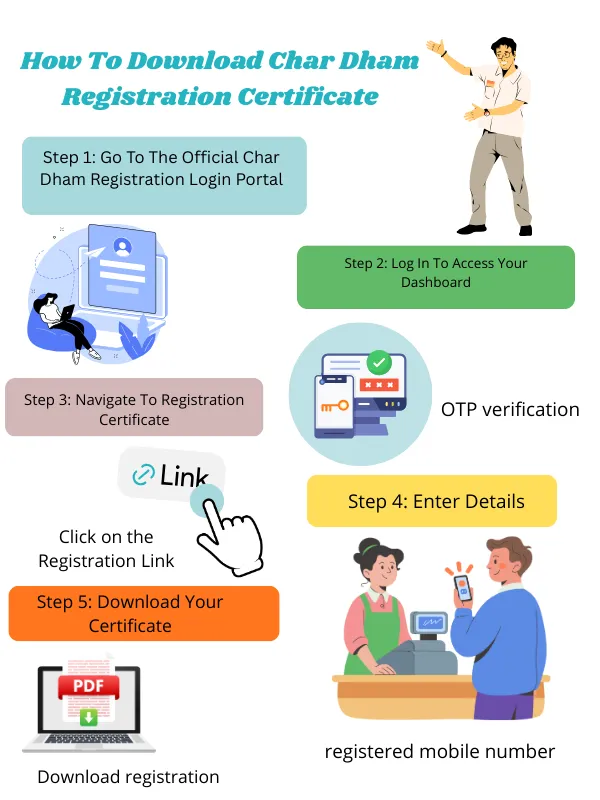
Step 1: Go To The Official Char Dham Registration Login Portal
Step 2: Log In To Access Your Dashboard
Log in via your registered mobile number and password. Complete your Char Dham registration login process through OTP verification.
Step 3: Navigate To Registration Certificate
Click on the “Registration Link” on your dashboard.
Step 4: Enter Details
Input your Unique registration number and registered mobile number. Enter the security captcha code.
Step 5: Download Your Certificate
Click on the “ Download registration certificate ” button. You can download your registration in the following format:
-
PDF format.
-
Mobile-friendly format.
-
Print requirement format.
Other Common Char Dham Registration Login Issues & Solutions
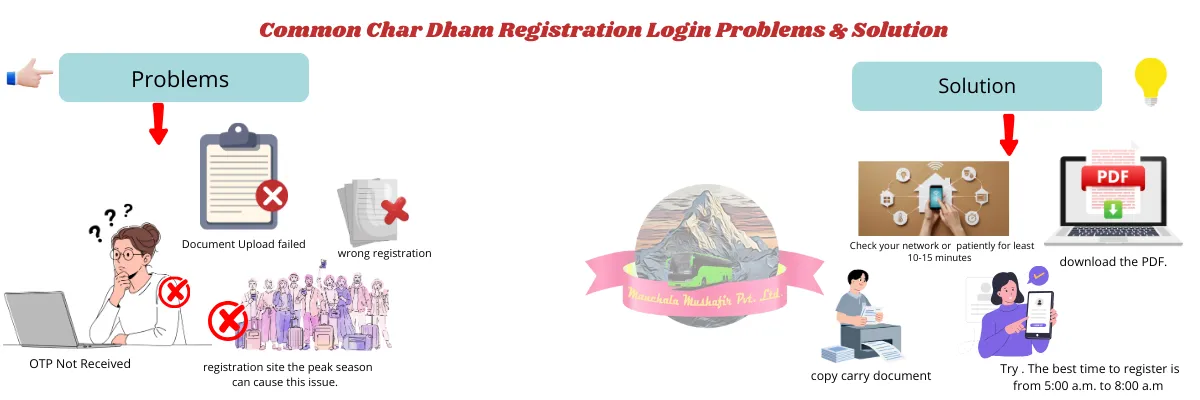
Common issues with Char Dham Registration Login, including OTP not received, technical glitches, document upload failure, and more, are caused by heavy traffic on the site during the peak yatra season.
Here are some common problems and their solutions:
-
Issue OTP Not Received: Due to a technical or network issue, or invalid information.
Solution:
Check your network coverage area or wait patiently for at least 10-15 minutes and recheck the given information.
-
“Please try again after some time.” Issue: High traffic on the registration site during the peak season can cause this issue.
Solution: Try Non-peak hours. The best time to register is from 5:00 a.m. to 8:00 a.m. and 10:00 p.m. to 11:00 p.m.
-
Document Upload failed: Sometimes uploading ID proof failed due to the wrong format of the upload.
Solution: Upload your document in JPG or PNG format with a size between 10 KB and 150 KB. Ensure that the file you upload is clearly visible.
-
Unable to download E-pass: Pilgrims often face issues in downloading their Registration pass.
Solution: Log in again to your dashboard and navigate to the manage tour section to download the PDF.
When To Contact Official Char Dham Helpline Or Support
If you face some issues like being unable to log in after trying multiple times, the edit option not showing, the registration status not updating, and others, then you can contact the Char Dham Registration Helpline Number.
Situations To Contact Official Char Dham Helpline Number
-
Unable to Log in even After Multiple Attempts.
-
Registration Complete but QR not generated: The registration process is submitted successfully, but the QR Code is not visible, or the dashboard of registered pilgrims is not shown.
-
Registration Status not Updated: Many times, pilgrims made changes in their application and saved the changes, but the registration status was shown as Pending.
-
Portal or App is not working for a long time: If you face server issues on the site for a very long time, you can contact the support team of the Char Dham registration login site.
Solution/Action: If you are facing any of the issues mentioned above, you can reach out to the Char Dham registration helpline number.
Support Helpline Numbers:
- Local Toll-free number: 1364
- Other state toll-free number: 0135-1364
Still Facing Char Dham Registration Login Issues?
Even after trying so many times, you face login issues; don’t worry, being your Ultimate travel Partner, our dedicated blogs on:
- Char Dham Yatra Registration 2026 Guide
- Char Dham Yatra Registration Online Process
- Char Dham Yatra E-pass Guide
To get complete guidance on the Char Dham Yatra Registration 2026 Login process, which is mandatory for all pilgrims who are planning to visit Char Dham in 2026.
Important Things To Know Before Logging Into Char Dham Portal
Before accessing the Char Dham registration login portal, pilgrims should be aware of a few important points to avoid login errors and last-minute issues during the yatra season.
• Registered mobile number is mandatory:
You can only log in using the same mobile number that was used during registration. OTPs are not sent to unregistered or changed numbers.
• OTP delays are common during peak season:
Due to heavy traffic on the portal, OTP delivery may take a few minutes. Avoid requesting OTP repeatedly, as this may temporarily block login attempts.
• QR code is required at checkpoints:
While login is not needed at checkpoints, carrying a valid QR code (digital or printed) is compulsory for verification during travel and temple entry.
• Editing access may be time-restricted:
Certain details can only be updated before travel dates are locked. Once slots are confirmed or the yatra date is near, editing options may be disabled.
• Use a stable device and internet connection:
Logging in from a stable network and updated browser reduces chances of session timeouts or dashboard loading errors.
Final Thoughts
Char Dham Registration is a compulsory process for pilgrims who are visiting Char Dham, as without a valid registration and a Unique QR code , you may not be allowed to proceed with your journey beyond Haridwar ( Dev Bhoomi / Land of God ) and Rishikesh ( Yoga Capital of India ).
Char Dham Registration Login issues are common during the peak yatra season due to server issues and network loads. However, most problems, such as not receiving the OTP, the website not loading, and server errors, can be resolved patiently with the right process, which is clearly outlined in this guide.
Note: For a comfortable and smoother pilgrimage experience, consider booking the Char Dham Yatra Package offered by Manchala Mushafir , which includes necessary facilities such as accommodation, meals, transportation, a guide, and more.
FAQs
-
Can I log in from another mobile number?
No
, you can not
log in to your Yatra registration application from another mobile number
. If you try with another number,
you might fail to log in
. To log in to your dashboard, you need the number that you used during your registration process.
-
Can one account manage multiple pilgrims?
Yes,
one account can manage multiple pilgrims
if you registered by choosing the
“Family/Group” option
. This option allows you to manage multiple pilgrims, who can be your family members, in one account. This option makes the registration process easier and less hectic.
-
Is Char Dham registration login required at checkpoints?
No
, pilgrims are not required to log in to the Char Dham registration portal at checkpoints if they have a
unique QR code
, which is used to verify at checkpoints. You just need to show the Char Dham registration
yatra e-pass or slip
to get entry inside the temples.
-
What if I change my mobile number?
If you change your mobile number, you may be required to re-register for the Char Dham yatra and cancel the old Char Dham registration process to ensure a valid registration for a safe and secure pilgrimage.


.webp?v=db21c909e1f30832a7f748735c7b8a1f)